$ cat project.json
Yappy
Private, on-device voice dictation for macOS — hold a key, speak, and your words land at the cursor in any app. Parakeet on the Apple Neural Engine; no cloud, no accounts.
$ github-linguist
$ ls ./screenshots
$ less README.md
<div align="center">
<img src="Documentation/assets/icon.png" alt="Yappy" width="128">
<img src="Documentation/assets/hero.png" alt="Yappy — talk, it types, everywhere on your Mac" width="820">
<h3>Voice-to-text for macOS that runs entirely on your Mac.</h3>
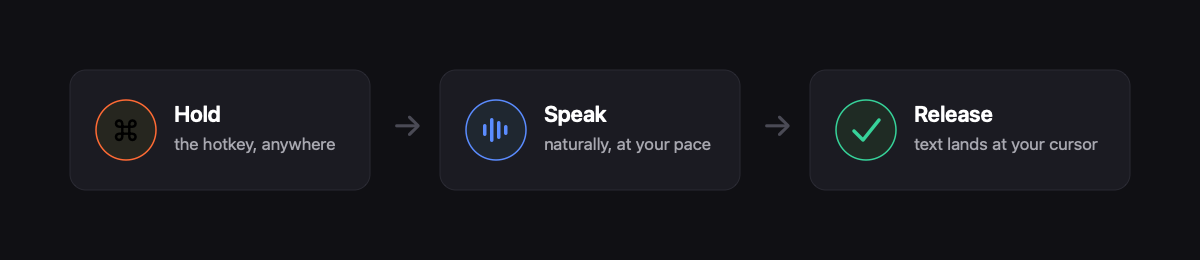
<p>Hold a key, speak, release — your words appear at the cursor in any app, usually in under a second.<br> No API keys. No cloud for dictation. No subscriptions. Dictation never leaves the device.</p>
<p>And when you want an <i>answer</i> instead of typing: hold <b>Fn</b> and ask. <b>Answers</b> is an optional, off-by-default assistant<br>that researches with web search through <i>your own</i> ChatGPT (Codex) or Grok account. Hold Fn again to follow up,<br>or say <i>"insert that"</i> to drop the answer straight into whatever you're writing.</p>
<p> <img src="https://img.shields.io/badge/macOS-14%2B-000000?style=flat-square&logo=apple&logoColor=white" alt="macOS 14+"> <img src="https://img.shields.io/badge/Swift-5.9-FF6B35?style=flat-square&logo=swift&logoColor=white" alt="Swift 5.9"> <img src="https://img.shields.io/badge/Engine-Parakeet%20on%20ANE-5b8cff?style=flat-square" alt="Parakeet on the Apple Neural Engine"> <img src="https://img.shields.io/badge/Dictation-100%25%20on--device-37d39a?style=flat-square" alt="Dictation 100% on-device"> <img src="https://img.shields.io/badge/License-MIT-555?style=flat-square" alt="MIT License"> </p>
<p><b><a href="https://superluis0.github.io/Yappy/">Website</a></b> · <b><a href="https://github.com/superluis0/Yappy/releases/latest">Download</a></b> · <b><a href="#setup">Setup</a></b></p>
</div>
Why Yappy
Most dictation apps stream your microphone to a server. Yappy doesn't. It runs NVIDIA's Parakeet speech model directly on the Apple Neural Engine (via FluidAudio) — so transcription is fast, private, and works on a plane with the Wi‑Fi off.
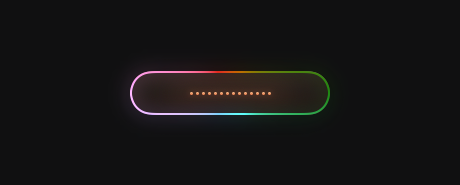
It stays out of your way until you need it: a single global hotkey, a small recording pill that fades in only while you talk, and text that lands wherever your cursor already is — your editor, Slack, the browser, a terminal, anywhere. While you hold the key, a soft glow circles the pill so you always know Yappy is listening — rainbow by default, or a calm white or orange if you prefer.
<div align="center"> <img src="Documentation/assets/listening-glow.png" alt="The recording pill while listening, ringed by the slowly circling rainbow glow" width="460"> </div>
<div align="center"> <img src="Documentation/assets/how-it-works.png" alt="Hold the hotkey, speak naturally, release — text lands at your cursor" width="820"> </div>
A real app, not just a menu bar blip
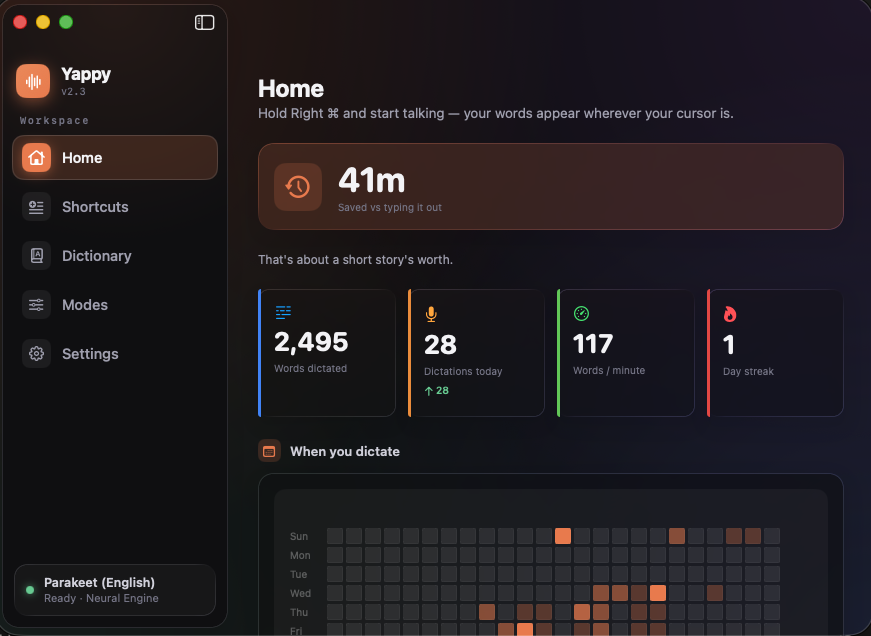
Open Yappy and you land on a home that actually tells you something: how much time dictation has saved you, your stats and personal records, a heatmap of when you dictate, the apps you use it in most, and your searchable history — all stored locally. The whole interface is a bespoke Liquid Glass design — a branded sidebar and translucent glass cards across every screen.
<div align="center"> <img src="Documentation/assets/home.png" alt="Yappy home — time saved, stats, a when-you-dictate heatmap, top apps, and personal records" width="420"> </div>
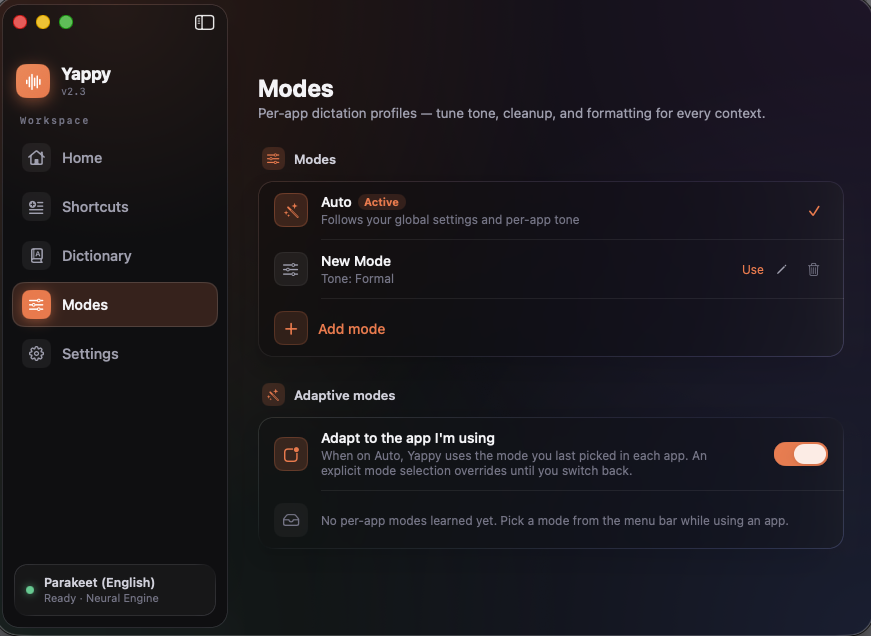
Build dictation modes for different contexts — and teach Yappy the names and jargon it mishears, either by typing the spellings or training them with your voice so it learns how it hears you.
<div align="center"> <img src="Documentation/assets/modes.png" alt="Yappy modes — Auto, Email, Code, and Journal profiles" width="560"> </div>
<div align="center"> <img src="Documentation/assets/dictionary.png" alt="Yappy custom dictionary, showing the spellings it learned to correct" width="560"> </div>
Everything is configurable in one place — hotkey, sounds, number formatting, numbered lists, filler removal, spoken commands, spoken punctuation, voice editing, voice commands, adaptive per-app modes, optional AI cleanup (with self-correction), and permissions.
<div align="center"> <img src="Documentation/assets/settings.png" alt="Yappy settings — hotkey, sounds, number formatting, filler removal, spoken commands, and voice editing" width="560"> </div>
Answers — hold Fn, get an answer
Dictation types what you say. Answers researches what you ask. Hold the Fn (Globe) key, say the question out loud — "what were the top AI headlines this week?", "compare the M4 chips in a table" — and release. The same listening glow rings the Answers pill while you speak, and stays on the card while it researches and answers — one glance tells you the mic is live.
<div align="center"> <img src="Documentation/assets/ask-listening-glow.png" alt="The Answers pill listening to a spoken question, ringed by the circling glow" width="440"> </div>
The answer streams into a floating dark-glass card at the bottom of your screen: live research steps while the model searches the web, then the answer itself, with the domains it cited shown as clickable source chips and a badge naming the model that answered. Tables render as real tables, code as code boxes, lists as lists, images load on click — and a wide table widens the card to fit. The card auto-dismisses on its own (longer answers linger longer); hover to pause it, click to pin it.
<div align="center"> <img src="Documentation/assets/ask-pill.png" alt="The Answers card answering a spoken question with a rendered table, ringed by the glow" width="520"> </div>
It goes further than a one-shot answer:
- Follow up without touching the keyboard. With an answer on screen, hold Fn again and ask the next thing — the conversation continues on the same thread, the card shows the question chain, and every turn is saved.
- Land the answer where you're working. Hit Insert, or just say "insert that", and the answer drops in as clean plain text at the cursor of the app you were in (tables become tab-separated). The card never stole your focus, so it goes exactly where you left off. Copy and Ask again are a click away too.
- Drive the card by voice. Whole-utterance commands only, so a real question is never mistaken for one: "copy that", "insert that", "pin that", "dismiss", "try again".
- Ask for more thinking when it matters. Prefix a question with "think harder, …" and Yappy routes that one question at higher reasoning effort.
- Hear the answer, hands-free. Turn on Read answers aloud and a Speak button appears on the card (or just say "read that"); "stop talking" stops it. This one is 100% local — a neural voice runs entirely on your Mac, so the answer text never leaves it. Optional and off by default: it lights up green once the voice engine is installed (
brew install espeak-ng && pip3 install mlx-audio "misaki[en]" && python3 -m spacy download en_core_web_sm, Apple Silicon), then downloads a small voice model on first use. Pick from eight American and British voices at the pace you like — Relaxed, Normal, Brisk, or Quick — or have every answer read automatically. It reads like a person, not a parser: dates, times, temperatures, and abbreviations are spoken the way you'd say them, tables are summarized into sentences instead of recited row by row, and markdown never leaks into the audio.
A few honest facts about how it works:
- It is the one Yappy feature that sends your question off this Mac — and it's off by default. Nothing about Answers runs, listens, or connects until you flip it on in Settings.
- It uses accounts you already have. No API keys and no Yappy account: if the Codex CLI (ChatGPT) or the Grok CLI is installed and signed in on your Mac, Yappy detects it automatically — a green light in Settings and you're done. Your spoken question goes to your model account; Yappy has no server in the middle.
- Only the transcribed question leaves your Mac. Speech-to-text still happens on-device; the audio itself never goes anywhere.
- The model can only answer — it can't act. Answers runs the model read-only: it researches and replies, and any attempt to run a command or control your Mac ends the turn on the spot. Both backends answer under one strict contract: be concise, cite sources, don't narrate.
- You stay in control of the moment. Click an answer to pin it (a pin icon unpins); press Esc or the stop button to interrupt mid-answer; ask right after launch and Yappy shows a brief Getting ready… while the speech model loads, then starts recording the instant it's set.
<div align="center"> <img src="Documentation/assets/ask-settings.png" alt="Answers setup in Settings — a silent readiness check with a green light, one toggle, and a model picker" width="560"> </div>
Pick your answering model — Codex (gpt-5.5) or Grok (Composer 2.5 Fast or Grok Build) — and switch anytime. Every completed answer lands in a searchable, local-only history in the main window: full-text search across questions and answers, filter by backend, star the ones worth keeping (favorites float to the top), and copy, re-show in the pill, or delete any of them — or Clear all. Show Last Answer in the menu bar re-summons the newest one, pinned.
<div align="center"> <img src="Documentation/assets/ask-history.png" alt="Answers history in the main window — past questions and fully rendered answers, stored locally" width="560"> </div>
Features
Local transcription — a selectable speech model, running on the Apple Neural Engine via FluidAudio. Parakeet (English) is the default — Parakeet TDT 0.6B, roughly 120× real-time on Apple Silicon, downloading once (~443 MB). Prefer another language? Switch to Nemotron 3.5 (multilingual, ~670 MB), which downloads on first use. Either way the model is fetched once and never phones home again; pick yours in Settings.
Universal insertion — pastes at the cursor in any app, including Electron apps, web views, and terminals where direct insertion fails. Your clipboard is snapshotted and restored, so nothing you copied gets clobbered.
Numbers written the way you'd type them — "three thirty pm" becomes 3:30 PM, "twenty dollars and fifty cents" becomes $20.50, "twenty twenty six" becomes 2026, "twenty third" becomes 23rd, "version eleven point six point zero" becomes 11.6.0. All local and deterministic — no LLM involved — and deliberately conservative, so "wait a second" and "one in a million" stay exactly as you said them.
Spoken lists — count off items and Yappy formats them: "one milk two eggs three bread" becomes a clean numbered list. Conservative by design — it only kicks in for a real run that starts at one, so a stray count inside a sentence stays put.
Clean transcripts — standalone fillers ("um", "uh") are stripped and the punctuation around them healed; say "new line" or "new paragraph" to insert real line breaks while you dictate. Both are toggles, and low-confidence noise decodes are discarded instead of inserted as garbage.
Spoken punctuation — dictate the marks you want: "comma", "period", "question mark", "open paren … close paren." It matches whole words only, so plurals and embedded words are safe, and it reads the words around them: "she missed her period", "add a dash of salt", and "each period lasts twenty minutes" stay as you said them, because a mark word straight after a, the, her, his, each and friends is a noun, not a command. It's also a toggle if you'd rather say those words literally.
Backtrack — change your mind mid-sentence and Yappy keeps the correction: "let's meet at 2, actually 3" lands as "Let's meet at 3." Part of the optional AI cleanup, so it rides along with whatever else cleanup is doing.
On-device AI cleanup — polish transcripts with a fix-up pass for punctuation, capitalization, and filler. It runs entirely on-device with Apple Intelligence (macOS 26+) and is on by default; where Apple Intelligence isn't available it degrades to the raw transcript. The same engine powers backtrack. A battery of output guards keeps it honest: a dictated question is typed, never answered; invented content is rejected in favor of your raw words; and spoken numbers render the way a typist would ("two point four" → 2.4, "three thirty pm" → 3:30 PM). Multi-line dictations are cleaned in a single validated pass, so long dictations stay fast.
See what the AI changed — and take it back — every dictation keeps the pre-cleanup transcript. Reveal or copy "what you said" from History, or say "use what I said" and Yappy swaps the raw words back in place. Trust the cleanup because you can always see past it.
Automatic updates — Yappy keeps itself current via Sparkle, with EdDSA-signed releases verified before they're applied. No surprise dialogs: when a new version is ready a calm banner slides in over the window, an Update to Yappy … item appears at the top of the menu bar, and a dot marks the menu-bar icon — install on your own schedule with one click. After an update, a short What's New card recaps what changed. Check manually any time from the menu bar or Settings → Software Update.
Voice editing — fix what you just said, hands-free: "scratch that" undoes the last insertion, "delete the last word" trims it, "all caps that" / "capitalize that" recases it, "use what I said" reverts the AI cleanup. It only fires on a whole-utterance command (so "scratch that idea" stays prose) and won't delete the wrong thing if your cursor has moved on.
Voice commands — drive the app by voice, spoken as their own utterance: "switch to email mode", "open scratchpad", "new note." Exact-match only (like voice editing), so a real dictation is never swallowed. A toggle.
Dictation modes — named profiles (Email, Code, Journal…) that bundle tone, AI-cleanup, formatting, and an extra vocabulary. Switch from the menu bar, or let a mode activate itself automatically for a kind of app. The built-in Auto mode follows your global settings — and, optionally, learns: it remembers the mode you last picked in each app and reapplies it there (an explicit pick still wins everywhere until you switch back to Auto).
Voice shortcuts — say a cue and Yappy expands it to canned text: an email signature, a calendar link, a block of boilerplate.
Smart suggestions — Yappy notices phrases you dictate over and over and offers, right on the home screen, to turn them into a shortcut — one click to add, or dismiss. Drawn entirely from your local history.
Scratchpad — a floating notepad a keystroke away (⌥⇧S), always on top like a sticky note. Jot or dictate into it without leaving whatever app you're in; notes are kept locally with a simple sidebar, and sync nowhere.
Context-aware tone — cleanup adapts to the app you're typing in, with tones that do exactly what they say: Formal expands contractions and guarantees full sentences, Casual drops the trailing period on short messages, and Verbatim skips cleanup entirely so nothing in a code editor gets reworded. Deterministic transforms, not AI improvisation — validated so they never change your meaning. Dictating into a one-line field (a search box, a URL bar)? Yappy notices and lands your words as one clean line.
Custom dictionary — teach Yappy your names, jargon, and acronyms. It comes pre-loaded with common developer and tool names — Supabase, Vercel, Cloudflare, Kubernetes, and more — so they transcribe right the first time. Add your own by typing the spellings it tends to mishear, or train them by voice — say a word a few times and Yappy learns how it hears you, then corrects those mishearings back to your spelling automatically. Deterministic and fully on-device; recordings are analyzed in memory and never saved.
Boost your terms in the speech model — one toggle makes recognition itself prefer your dictionary while you dictate (Parakeet/English; a one-time ~98 MB helper model). Not find-and-replace after the fact — the recognizer is steered toward your vocabulary as it decodes.
Learns from your corrections — say "scratch that", re-dictate the word you meant, and Yappy notices the difference and offers to remember it — a one-tap suggestion card in Dictionary, never applied silently. The more you correct it, the better it hears you, entirely on-device.
Activity at a glance — a "time saved versus typing" headline, words-per-minute, streaks and personal records, a day-by-hour heatmap of when you dictate, the apps you use it in most, and a shareable "Year in Voice" recap.
Polished hotkeys — hold Right ⌘, double-tap Right ⌘, hold Right ⌥, or hold Right ⌃ for dictation; hold Fn for Answers (when enabled). A debounced state machine ignores key repeats and accidental taps, so it never fires when you don't mean it. Press Esc to cancel while recording — or while Yappy is still transcribing, to stop the text before it lands.
Considered details — a molten-glass recording pill whose glow breathes with your voice and shifts into a quiet Polishing state while AI cleanup runs, a listening glow that slowly circles the pill while the key is held (rainbow, white, or orange — pick in Settings, and it carries through to the Answers card), a menu bar icon that animates while recording, and subtle custom start/stop/done sounds — including a distinct cue when something goes wrong, so failure never sounds like success.
Private by design — audio is transcribed on-device and your voice is never recorded to a file; no telemetry, no account. After the speech model download, dictation runs fully offline — nothing you dictate leaves your Mac. The network is also used for Sparkle update checks and update downloads, optional voice/speech model downloads, and the opt-in Answers feature (off by default), which sends your transcribed question (never the audio) to the model account you connect, and runs that model read-only — it can research and answer, but a tool or command event kills the turn. A privacy panel on the home screen reflects this state at a glance.
Setup
Dictation works after Step 1 — about two minutes. Steps 2–4 are optional; turn them on whenever you want them.
| To use… | You'll need |
|---|---|
| Dictation (required) | Install the app, grant Microphone + Accessibility |
| Answers (hold Fn to ask) | The Codex or Grok CLI, signed in |
| Read answers aloud | One setup command (Homebrew + pip) |
| AI cleanup | Apple Intelligence turned on (macOS 26+) |
1. Install Yappy (required)
macOS 14 or newer, on an Apple Silicon Mac (M1 or later).
- Download
Yappy.dmgfrom the Releases page, open it, and drag Yappy into your Applications folder. - Launch it. Yappy is Apple-notarized, so it opens cleanly — no "unidentified developer" warning and no terminal workarounds.
- A short first-run flow asks for the only two permissions Yappy needs:
- Microphone — to hear you.
- Accessibility — to detect the hotkey and paste text at your cursor.
- Hold Right ⌘, say a sentence, and release. On first use Yappy downloads its speech model once (~443 MB); after that, dictation runs fully offline.
That's a complete, private dictation app. Everything below is optional.
2. Answers — ask questions by voice (optional)
Hold Fn and ask out loud; the answer streams into a card at the bottom of your screen. It runs on your own AI account — no API keys, nothing for Yappy to bill.
- Free the Globe key so Fn is reliable: System Settings → Keyboard → Press 🌐 to → Do Nothing. (Yappy's Settings has a button that opens this for you.)
- Install a backend and sign in — the Codex CLI (your ChatGPT account) or the Grok CLI (your grok.com account). Both run on Node.js; install per their instructions, then sign in once from a terminal.
- Open Settings → Answers. Yappy detects the signed-in CLI automatically — a green light means you're set. Pick your model, then hold Fn and ask.
3. Read answers aloud (optional)
Give Answers a voice that reads replies out loud. This one is 100% on-device: the answer text never leaves your Mac.
- Install the voice engine with one command (needs Homebrew):
brew install espeak-ng && pip3 install mlx-audio "misaki[en]" && python3 -m spacy download en_core_web_sm - In Settings → Answers, turn on Read answers aloud. It lights up green, then downloads a small voice model (~336 MB) on first use.
- Pick from eight American and British voices — tap play to preview one — or have every answer read automatically.
> Yappy uses your Homebrew Python for the voice engine. If the green light doesn't appear after installing, your pip3 likely installed into a different Python; re-run the command with Homebrew's python3 -m pip ….
4. On-device AI cleanup (optional, on by default)
Tidies filler, punctuation, and capitalization as you dictate — fully on-device, with nothing to install. It just needs Apple Intelligence (macOS 26+ on a supported Mac): turn it on in System Settings and Yappy uses it automatically. Where it isn't available, Yappy inserts your raw words and nothing breaks.
Build from source
Prefer to build it yourself? Requires Xcode 15+ and macOS 14+.
git clone https://github.com/superluis0/Yappy.git
cd Yappy
open Yappy.xcodeproj
Then press Run (⌘R) in Xcode — dependencies (FluidAudio) resolve automatically via Swift Package Manager on the first build.
> Tip: if another FluidAudio app (such as VoiceInk) has already downloaded Parakeet, Yappy reuses it from ~/Library/Application Support/FluidAudio/Models/ — no second download.
> Maintainer shortcut: Scripts/rebuild-install.sh rebuilds the Release app, verifies it's signed with the same Apple Developer ID as public releases (so Microphone/Accessibility grants survive across dev builds and Sparkle updates), and installs + relaunches it — refusing to install if the signature is wrong. Use --test to gate on the unit suite first, or --build-only to just verify a build. This requires the maintainer's Developer ID certificate.
> Cutting a public release: Scripts/release-dmg.sh builds a Developer ID–signed, notarized, stapled Yappy.dmg into dist/ (the download that opens with no Gatekeeper warnings), and with --publish <tag> uploads it to a GitHub Release. Needs a one-time notarytool keychain profile — run Scripts/release-dmg.sh --help for setup. Maintainer-only.
Privacy
Yappy's two capabilities have different privacy stories, and we'd rather you know exactly which is which:
Dictation — 100% on-device, always.
- Audio is transcribed on-device and held only in memory — the recording itself is never written to disk.
- Your dictation history, shortcuts, and custom dictionary are stored locally under
~/Library/Application Support/Yappy/, written with owner-only file permissions. Clear your history anytime from the home window or Settings. - History is under your control: turn it off entirely, or set a retention window (7/30/90 days) and older entries prune themselves. Nothing is ever recorded while a password field (secure input) is focused.
- No telemetry, no analytics, no account.
- Speech models download as needed (from Hugging Face or a hosted release). Sparkle checks for app updates over HTTPS and downloads them when you accept one. After models are local, dictation runs fully offline.
Answers — opt-in, and only your question travels.
- Off by default. Until you enable it in Settings, the only network traffic is model downloads and Sparkle update checks and downloads.
- When you use it, your spoken question is transcribed on-device first; only the resulting text is sent — to the Codex (ChatGPT) or Grok account you signed into, using the CLI already on your Mac. The audio never leaves.
- Yappy operates no server and stores no keys: it talks to your locally installed, locally authenticated CLI, the same one you use in a terminal. Web searches the model performs happen under your account, per that provider's privacy policy.
- The connected model is run read-only — it answers, it can't act. Any tool or command event during a turn ends that turn, enforced at runtime.
- Save answer history is its own toggle. When it's on, answers are saved to a local answer history under the same folder and permissions as everything else — browse, delete individually, or clear it all anytime. Logs never contain your question text, and answer images load only when you click them.
Architecture
| Area | Files | Role |
|---|---|---|
| Transcription | Services/ParakeetTranscriptionService.swift |
Loads & pre-warms the selected model (Parakeet or Nemotron); batch transcription on release |
| Audio capture | App/AudioRecorder.swift |
AVAudioEngine → in-memory 16 kHz mono Float32 |
| Hotkeys | Services/HotkeyManager.swift |
One CGEvent tap + a pure, unit-tested state machine |
| Text insertion | Services/TextInserter.swift |
Cmd+V paste with change-count-safe clipboard restore |
| AI cleanup | Services/CleanupCoordinator.swift, FoundationModelsCleanupProvider.swift |
Routes cleanup and backtrack to on-device Apple Intelligence; graceful fallback |
| Transcript formatting | Services/TranscriptPipeline.swift + Spoken*Formatter.swift |
Fillers, numbers, lists, line breaks, punctuation — deterministic, on-device |
| Custom dictionary | Core/DictionaryStore.swift, Core/BuiltInDictionary.swift |
Built-in dev terms + learned aliases corrected back to canonical spelling |
| Scratchpad | UI/ScratchpadController.swift, Core/NotesStore.swift |
Floating notepad (⌥⇧S) with local note storage |
| Answers (optional) | Services/AskController.swift, CodexAskClient.swift, GrokAskClient.swift |
Fn-key voice questions via your own Codex/Grok CLI; block-rendered answers, local history |
| Pill & windows | UI/ |
Floating pill, Answers card, home window, settings, onboarding |
Tests
xcodebuild -project Yappy.xcodeproj -scheme Yappy test
Over 1,000 tests cover the hotkey state machine, settings persistence and migration, the transcript pipeline (numbers, lists, spoken punctuation, cross-stage interactions), the AI-cleanup accept/reject guard policy (never answer, never invent, never drop), deterministic tone transforms, the custom dictionary with speech-model term boosting and correction mining, the notes store, history-based shortcut suggestions, voice-command parsing, adaptive per-app mode resolution, dictation history and stats, voice-shortcut expansion, app-context classification, and the Answers stack (run state machine, Fn-hold state machine, controller orchestration driven through injected fakes — follow-ups, insert-at-cursor, and card voice commands, Codex/Grok wire-format parsers, block markdown rendering, and answer history persistence).
Built with
- FluidAudio — Parakeet, CoreML, and the Apple Neural Engine inference stack.
License
MIT — see LICENSE.