$ cat project.json
Oatmeal
Private, on-device AI meeting notes for macOS. Local transcription + your own LLM, no cloud.
$ github-linguist
$ ls ./screenshots
$ less README.md
<div align="center">
<img src="docs/assets/hero.svg" alt="Oatmeal" width="100%" />
<h3>Private, on-device meeting notes for macOS.</h3> <p><strong>Record any call, get a speaker-labeled transcript, AI notes, summaries & action items, then chat with it.</strong><br/> Everything runs on your Mac. No cloud. No account. No bots in your meetings.</p>
<p> <img alt="Platform" src="https://img.shields.io/badge/macOS-14%2B-111?logo=apple&logoColor=white" /> <img alt="Swift" src="https://img.shields.io/badge/Swift-5.0-F05138?logo=swift&logoColor=white" /> <img alt="SwiftUI" src="https://img.shields.io/badge/SwiftUI-0A84FF?logo=swift&logoColor=white" /> <img alt="On-device" src="https://img.shields.io/badge/100%25-on--device-5C9A6B" /> <img alt="License" src="https://img.shields.io/badge/License-MIT-E08A3C" /> <img alt="PRs welcome" src="https://img.shields.io/badge/PRs-welcome-F4B65C" /> </p>
<sub>Built with <a href="https://github.com/FluidInference/FluidAudio">FluidAudio</a> (Parakeet & Nemotron ASR + diarization), <a href="https://lmstudio.ai">LM Studio</a>, SwiftUI, and SwiftData</sub>
</div>
<br/>
> Why Oatmeal? Meeting notetakers are wonderful, and they usually ship your most sensitive > conversations to someone else's servers. Oatmeal gives you the same magic (transcripts, AI > summaries, action items, and "chat with your meeting") while every byte of audio and every model > call stays on your machine. It's the cozy, private alternative.
<br/>
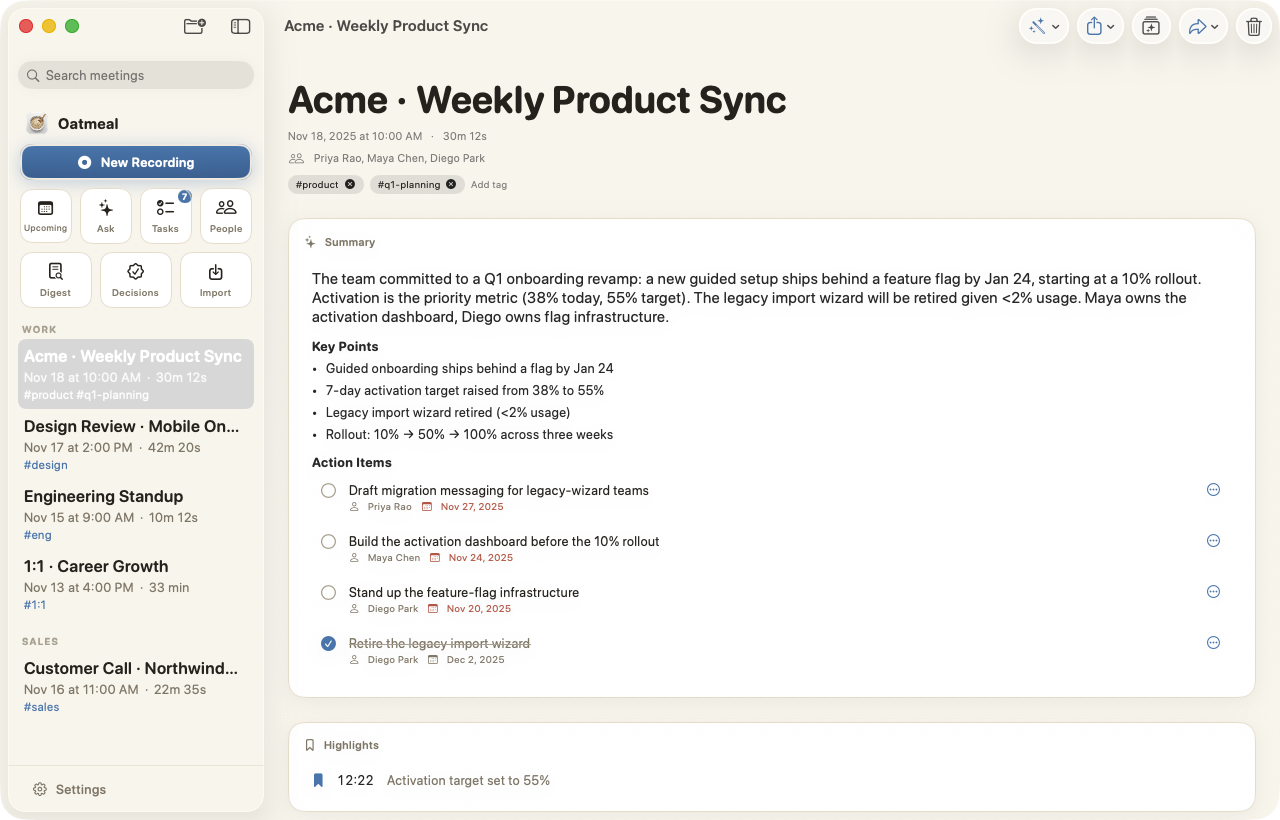
<div align="center"> <img src="docs/assets/app-enhanced.png" alt="Oatmeal meeting view with AI-enhanced notes" width="85%" /> <br/><sub>AI-enhanced notes with decisions, key numbers, and action items, grounded in the transcript.</sub> </div>
<br/>
✨ Highlights
- 🎙️ One-click capture: records the other participants (system audio) and your mic. No meeting bots, no invite links. Works for online calls and in-person meetings (a one-tap switch by the record button).
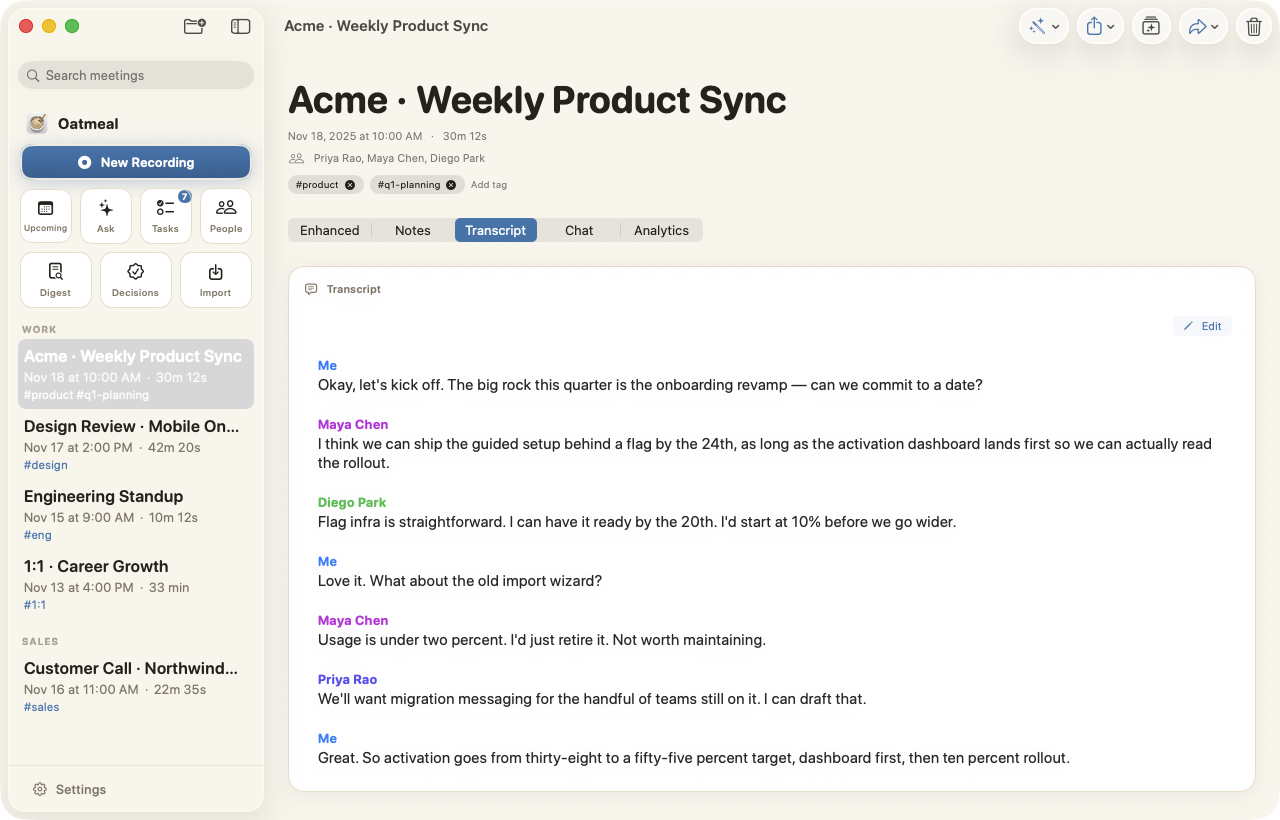
- 🗣️ Speaker-labeled transcripts: on-device diarization with editable names, merge, and re-identify. A quick confirm-speakers step at wrap-up (shown only when names are uncertain) gets attribution right up front — and fixing a speaker afterward keeps the summary, key points, and action items in sync automatically (a plain rename patches them instantly; a structural change offers one-tap Update summary).
- 🛟 Recordings are safe: the audio is saved the moment you stop, so a hiccup (LM Studio offline, an interrupted run) never loses a meeting — re-run the transcript and summary from the recording in one tap.
- ⚡ Two transcription engines: Parakeet (proven default) or NVIDIA's new Nemotron streaming model for live captions — swap anytime in Settings, both fully on-device.
- ✍️ Notes that write themselves: jot a few words, and the local LLM turns them into clean, structured notes.
- 🧠 Summaries & action items: decisions, owners, numbers, and follow-ups, extracted automatically.
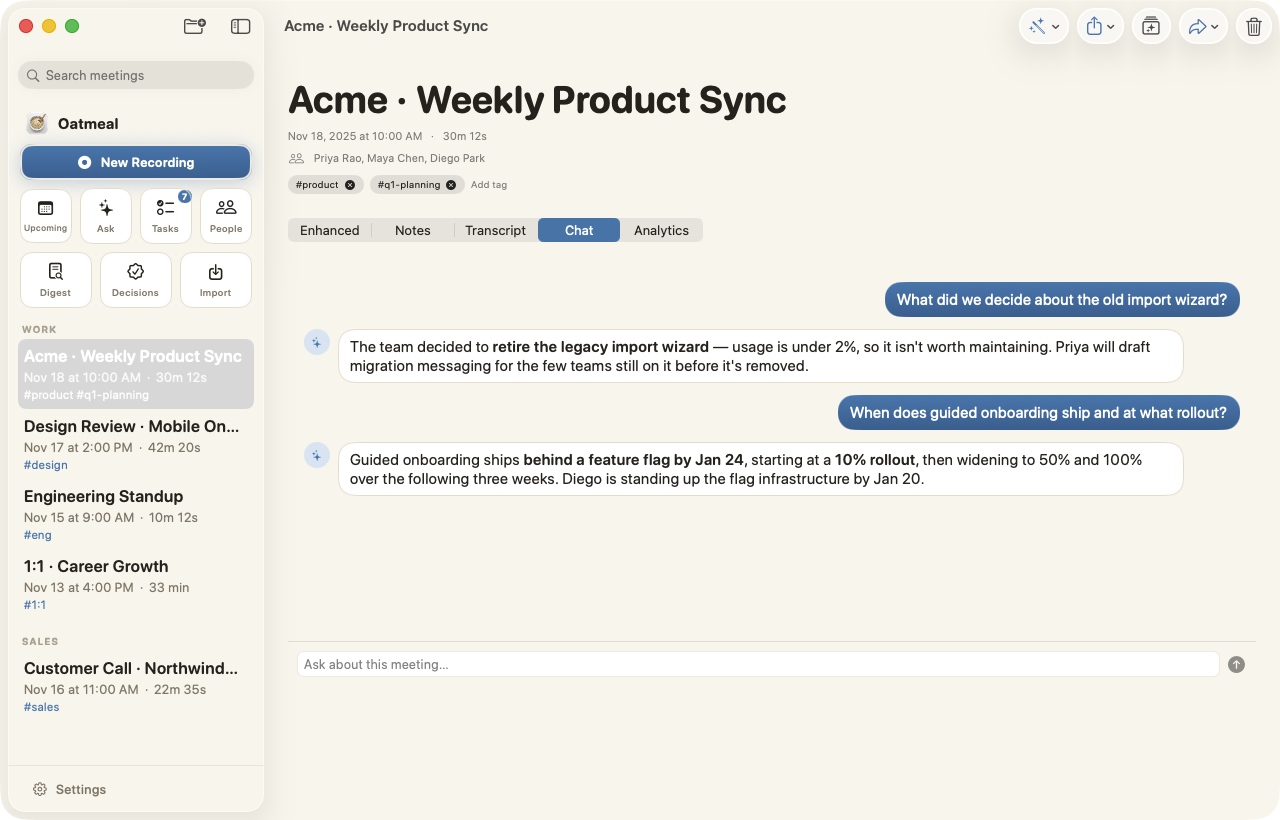
- 💬 Chat with a meeting: ask anything, and hybrid semantic + keyword retrieval grounds every answer in that meeting.
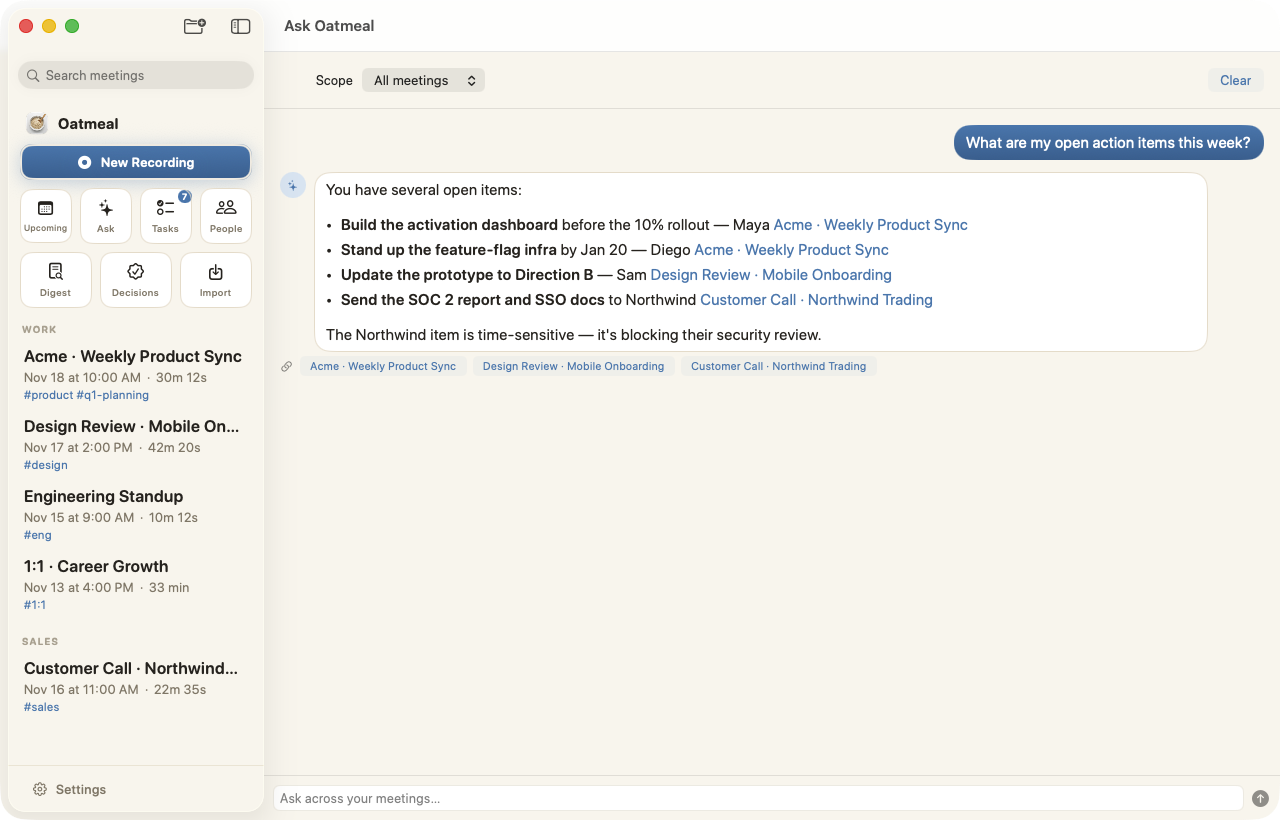
- 🌍 Ask across everything: query your whole history with tappable source citations.
- 📋 Prep before the call: from Upcoming, confirm who's speaking (names + emails pulled from the invite), jot talking points, and see your history with these people — the roster pre-labels speakers and feeds recap emails once you record.
- 🟢 Live Assist: when you're asked something, a discreet teleprompter near the top of your screen quietly suggests what to say next, in plain, spoken language. Built for interviews and sales.
- 🪟 Floats over your call: the cue and your record controls stay above full-screen video calls (Zoom, Teams, Meet), always one glance away.
- 🎬 Alive, not flashy: an audio-reactive record button and waveform, streaming notes, and tasteful motion throughout, all of it respecting Reduce Motion.
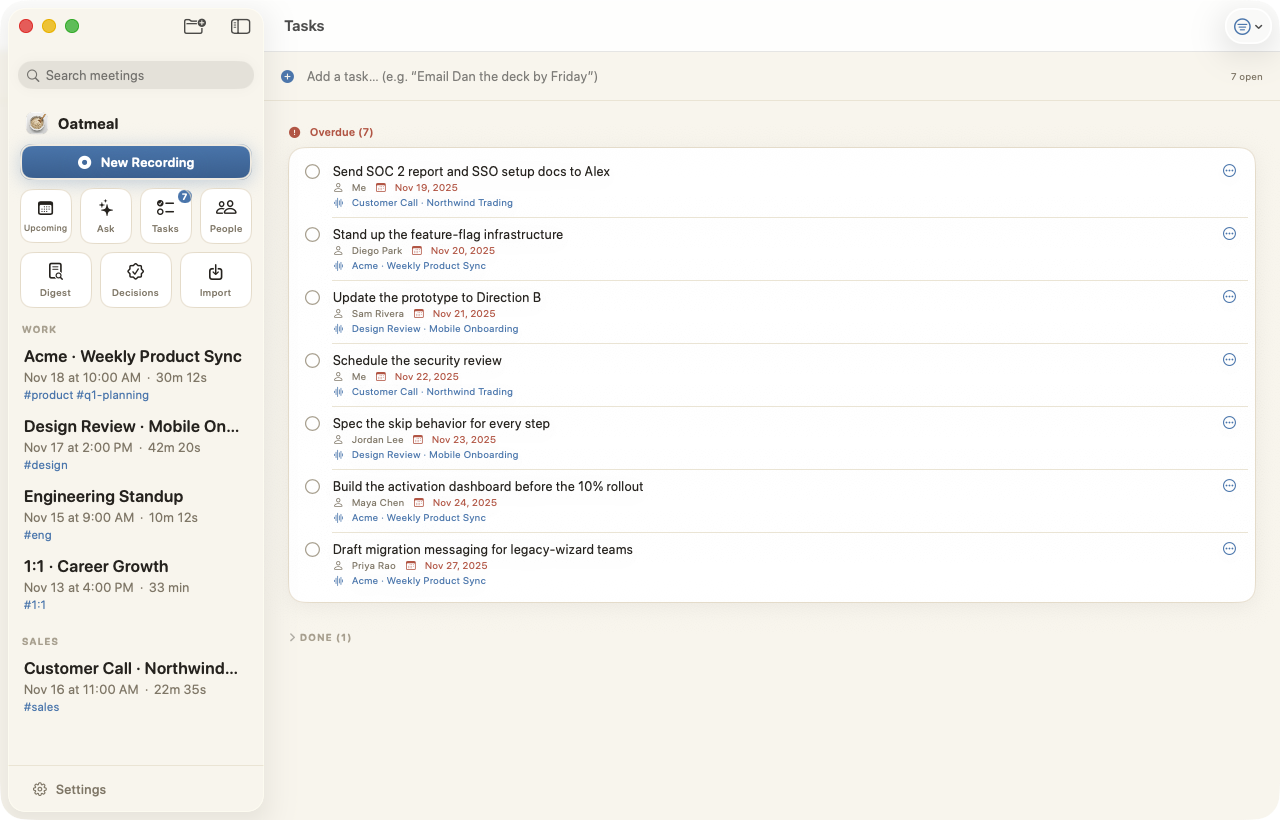
- ✅ Tasks & Reminders: action items become tasks, and optionally sync to Apple Reminders.
- 🔌 Local MCP server: expose meetings (read-only) to agents like Claude.
- ⬆️ One-click updates: when a new version ships, Oatmeal offers to download and install it for you (signed + verified, powered by Sparkle). Toggle off in Settings to stay fully offline.
- 🔒 Private by design: no cloud, no telemetry, no account. Data lives in
~/Library/Application Support/Oatmeal.
<br/>
📸 A tour
<table> <tr> <td width="50%" valign="top"> <img src="docs/assets/app-transcript.png" alt="Speaker-labeled transcript" /><br/> <strong>Speaker-labeled transcript</strong><br/> <sub>Diarized on-device. Rename, merge, or re-identify speakers anytime.</sub> </td> <td width="50%" valign="top"> <img src="docs/assets/app-chat.png" alt="Chat with a meeting" /><br/> <strong>Chat with the meeting</strong><br/> <sub>Answers are grounded only in this meeting, and hybrid retrieval finds what was said.</sub> </td> </tr> <tr> <td width="50%" valign="top"> <img src="docs/assets/app-ask.png" alt="Ask across all meetings" /><br/> <strong>Ask across all meetings</strong><br/> <sub>Cross-meeting answers with clickable source citations.</sub> </td> <td width="50%" valign="top"> <img src="docs/assets/app-tasks.png" alt="Tasks extracted from meetings" /><br/> <strong>Tasks, automatically</strong><br/> <sub>Action items with owners and due dates, collected across every meeting.</sub> </td> </tr> <tr> <td width="50%" valign="top"> <img src="docs/assets/app-analytics.png" alt="Meeting analytics" /><br/> <strong>Analytics & coaching</strong><br/> <sub>Talk-time balance and conversation insights for each meeting.</sub> </td> <td width="50%" valign="top"> <img src="docs/assets/app-people.png" alt="People directory" /><br/> <strong>People</strong><br/> <sub>Everyone you meet with, and the meetings you share.</sub> </td> </tr> <tr> <td width="50%" valign="top"> <img src="docs/assets/app-palette.png" alt="Command palette" /><br/> <strong>Command palette (⌘K)</strong><br/> <sub>Jump to any meeting or run any command in a keystroke.</sub> </td> <td width="50%" valign="top"> <img src="docs/assets/app-onboarding.png" alt="First-run onboarding" /><br/> <strong>Friendly first run</strong><br/> <sub>A short, private setup for mic, audio, and your local AI.</sub> </td> </tr> </table>
<sub>Screens shown with fictional sample data.</sub>
<br/>
🚀 Quick start
Requirements
- macOS 14 (Sonoma)+, Apple Silicon recommended
- Xcode 15+
- XcodeGen:
brew install xcodegen - LM Studio (or any OpenAI-compatible local server) for the AI features
> First-run downloads. The FluidAudio Swift package is fetched automatically when you build. > The on-device speech models (Parakeet transcription + speaker-diarization weights, ~450 MB total) > download automatically the first time you record. After that, transcription runs fully offline. > Optional: switch live captions to NVIDIA's Nemotron streaming model in Settings → > Transcription (Apple Silicon, ~0.5 GB more on first use, also fully on-device).
1 · Start your local AI
Install LM Studio, download a modern instruct model with a healthy context window, and start
its local server. Oatmeal talks to http://127.0.0.1:1234 by default (configurable in
Settings → AI).
2 · Build & run
git clone https://github.com/superluis0/Oatmeal.git
cd Oatmeal
xcodegen generate        # generate Oatmeal.xcodeproj from project.yml
open Oatmeal.xcodeproj    # build & run the "Oatmeal" scheme
Prefer a scripted install? reinstall.sh builds to /tmp (Xcode can't code-sign inside an
iCloud-synced folder), installs to ~/Applications, and signs with a stable self-signed
identity so macOS remembers your Mic and Screen-Recording grants across rebuilds:
./reinstall.sh && open ~/Applications/Oatmeal.app
3 · Grant permissions on first launch
| Permission | Why |
|---|---|
| Microphone | Transcribe your voice |
| Screen Recording | Required by macOS to capture system audio (the other participants) |
| Calendar (optional) | Auto-title meetings and show what's upcoming |
| Reminders (optional) | Push action items to an "Oatmeal" list |
> 💡 Record with headphones. Without them, the other party's audio plays out your speakers and > leaks into your mic, which can duplicate transcript lines. Oatmeal de-duplicates this echo > automatically, but headphones eliminate it at the source.
> 🖥️ Screen Recording needs a relaunch to take effect. macOS only applies a new Screen Recording > grant after the app restarts — and Oatmeal keeps running in the menu bar, so fully quit it > (menu-bar icon → Quit) and reopen after enabling it. If the other participants still aren't being > captured, Oatmeal shows a clear "only your microphone is recording" warning (in-app and on the > floating panel) instead of quietly saving a one-sided transcript.
<br/>
🔒 Privacy
Oatmeal is private by default:
- Audio, transcripts, notes, and embeddings live only on your Mac.
- Transcription and speaker diarization run on-device, so no audio is ever uploaded.
- LLM features call only the local server URL you configure.
- The optional webhook and MCP mirror are off / local unless you turn them on.
The only network activity is a one-time download of the speech models on first run, the calls Oatmeal makes to your own local LLM, and an optional once-a-day update check (via Sparkle, which fetches a small signed release feed over HTTPS; toggle in Settings → Updates). Your audio and notes are never sent anywhere.
<br/>
🏗️ How it works
<div align="center"> <img src="docs/assets/how-it-works.svg" alt="Architecture: AVAudio capture feeds FluidAudio (Parakeet ASR + diarization) to produce a speaker-labeled transcript, which a local LM Studio model turns into summaries, notes, chat, action items, and live assistance, all persisted in SwiftData with on-device embeddings for RAG." width="100%" /> </div>
| Path | What |
|---|---|
Oatmeal/ |
The macOS app (SwiftUI + SwiftData) |
OatmealMCP/ |
A minimal stdio MCP server exposing the read-only meeting mirror |
project.yml |
XcodeGen project definition (the .xcodeproj is generated, not committed) |
reinstall.sh |
Build, install, and self-sign helper (local dev) |
release.sh |
Cut a signed, auto-updatable release + appcast — see docs/RELEASING.md |
<br/>
🧑💻 Contributing
Issues and PRs are welcome! The Xcode project is generated by XcodeGen, so make project/target
changes in project.yml and run xcodegen generate (don't edit the .xcodeproj directly).
Cutting a release (signed build + one-click-update appcast) is documented in docs/RELEASING.md.
<br/>
📄 License
MIT. Do anything you like; just keep the notice.
<div align="center"><sub>Made for people who want great meeting notes <strong>and</strong> their privacy. 🥣</sub></div>