$ cat project.json
HermesLaunch
HermesLaunch A native macOS app for the Hermes Agent — one window for everything, one keystroke away. Chat with live streaming thinking, talk to the agent with on-device voice, switch models, watch swarm agents work a live Kanban board, manage tools & automations, and read a beautiful usage dashboard — all in one unified window with 16 built-in themes (light & dark), a menu-bar companion, and a gl...
$ github-linguist
$ ls ./screenshots
$ less README.md
<div align="center">
<img src="assets/icon.png" width="128" height="128" alt="HermesLaunch icon" />
HermesLaunch
A native macOS app for the Hermes Agent — one window for everything, one keystroke away.
Chat with live streaming thinking, talk to the agent with on-device voice, switch models, watch swarm agents work a live Kanban board, manage tools & automations, and read a beautiful usage dashboard — all in one unified window with 16 built-in themes (light & dark), a menu-bar companion, and a global command palette. No terminal required.
<p> <img alt="Platform" src="https://img.shields.io/badge/macOS-14%2B-111111?style=flat-square&logo=apple&logoColor=white" /> <img alt="Swift" src="https://img.shields.io/badge/Swift-5-F05138?style=flat-square&logo=swift&logoColor=white" /> <img alt="UI" src="https://img.shields.io/badge/AppKit%20%2B%20SwiftUI-2563EB?style=flat-square" /> <img alt="AI" src="https://img.shields.io/badge/voice-on--device-22C55E?style=flat-square" /> <img alt="License" src="https://img.shields.io/badge/license-MIT-8B5CF6?style=flat-square" /> </p>
<br/>
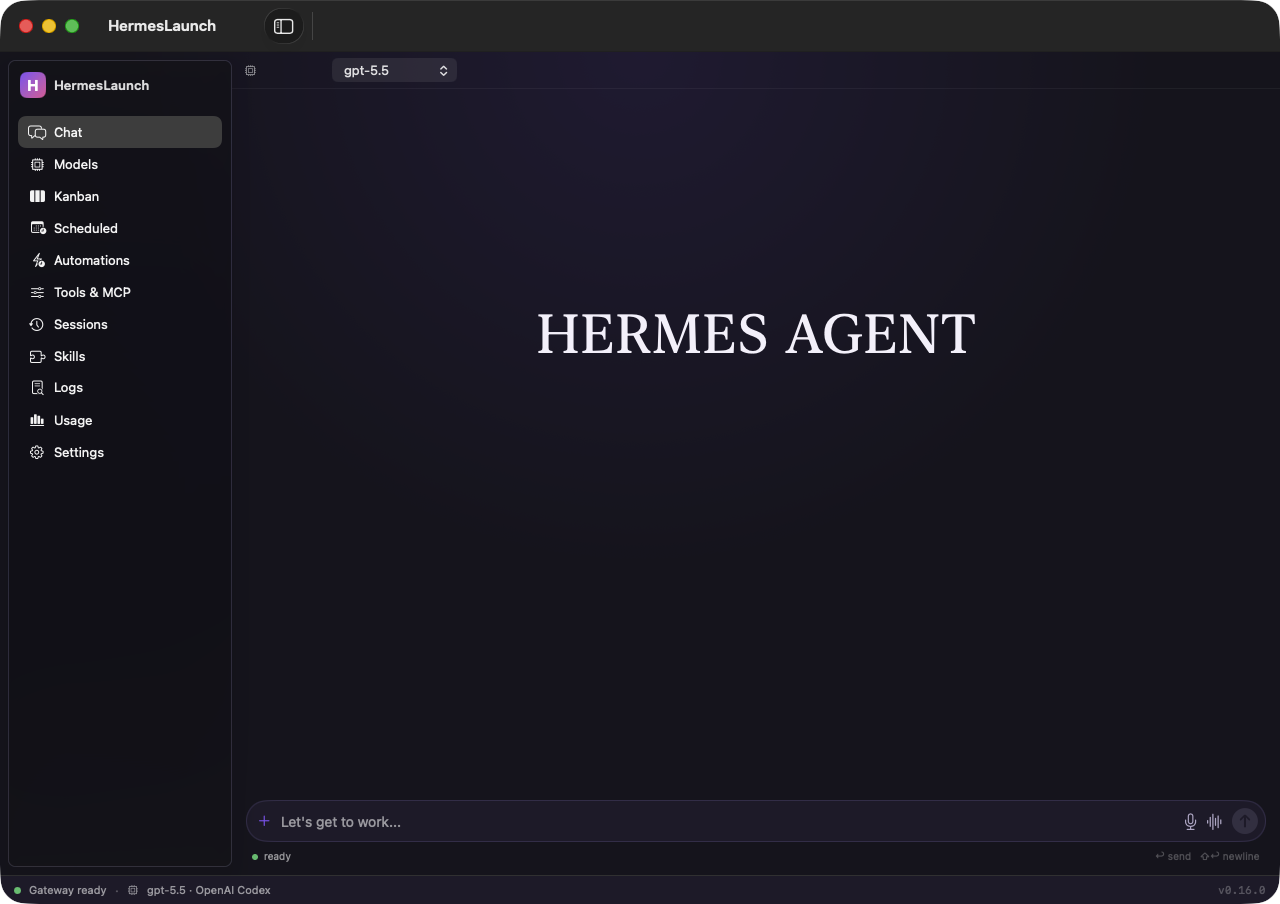
<img src="assets/app-chat.png" alt="HermesLaunch unified window" width="900" />
<sub><b>One window, everything in reach</b> — a sidebar for Chat, Models, Kanban, Tools, Automations, Sessions, Usage and more.</sub>
</div>
✦ Why HermesLaunch
Hermes is a powerful terminal-native AI agent. HermesLaunch wraps it in a first-class native macOS app: a single window with a sidebar where every capability is a pane, plus a menu-bar companion for quick access and a global command palette (⌥Space) from anywhere. It's built with AppKit + SwiftUI + Swift Charts, with on-device voice powered by the FluidAudio Swift package (Parakeet ASR + Kokoro TTS, on the Apple Neural Engine) — no cloud, no API keys.
Hybrid by design: it launches as a menu-bar accessory (no Dock icon); opening the main window promotes it to a full Dock app, and closing the window drops it back to the menu bar.
🪟 One window, every tool
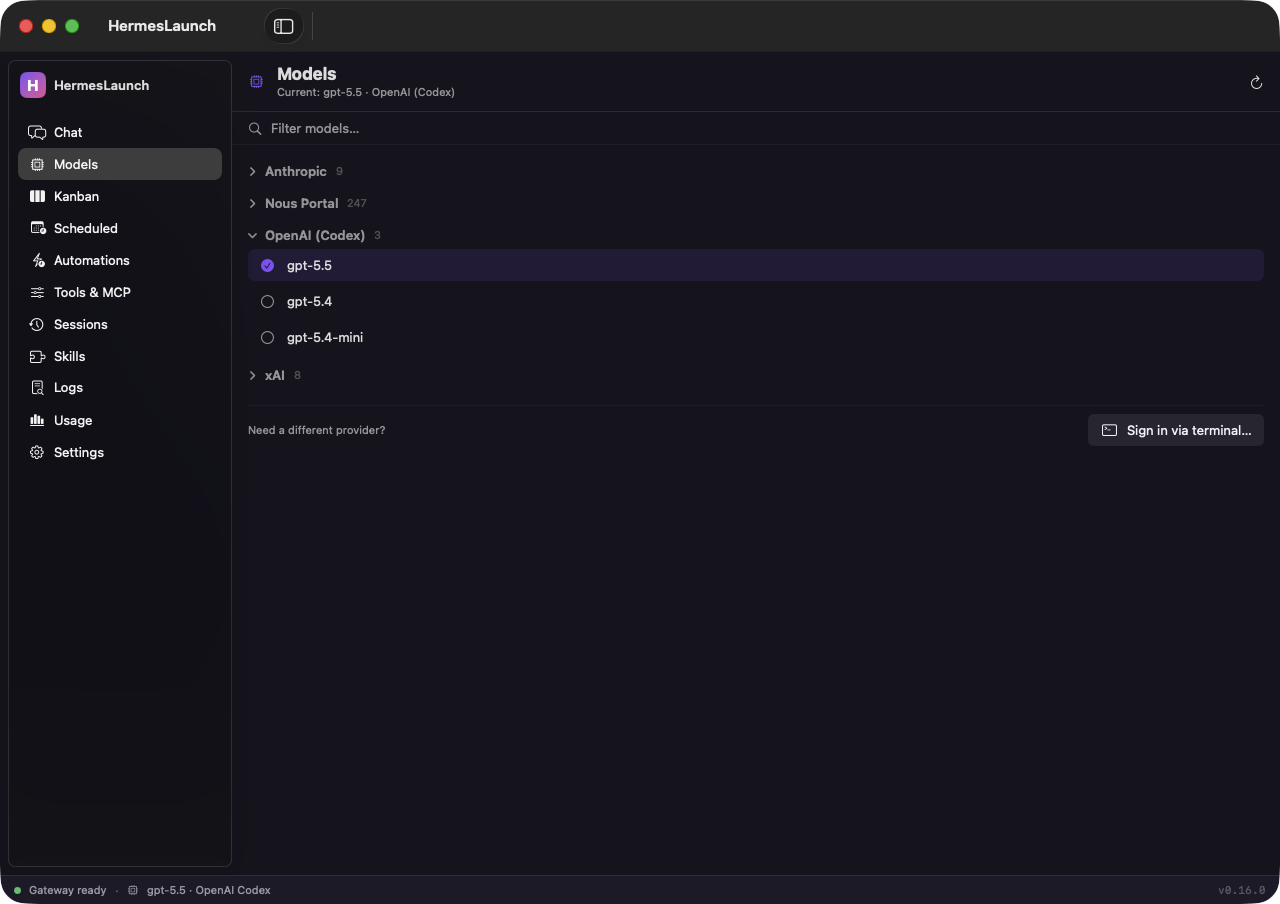
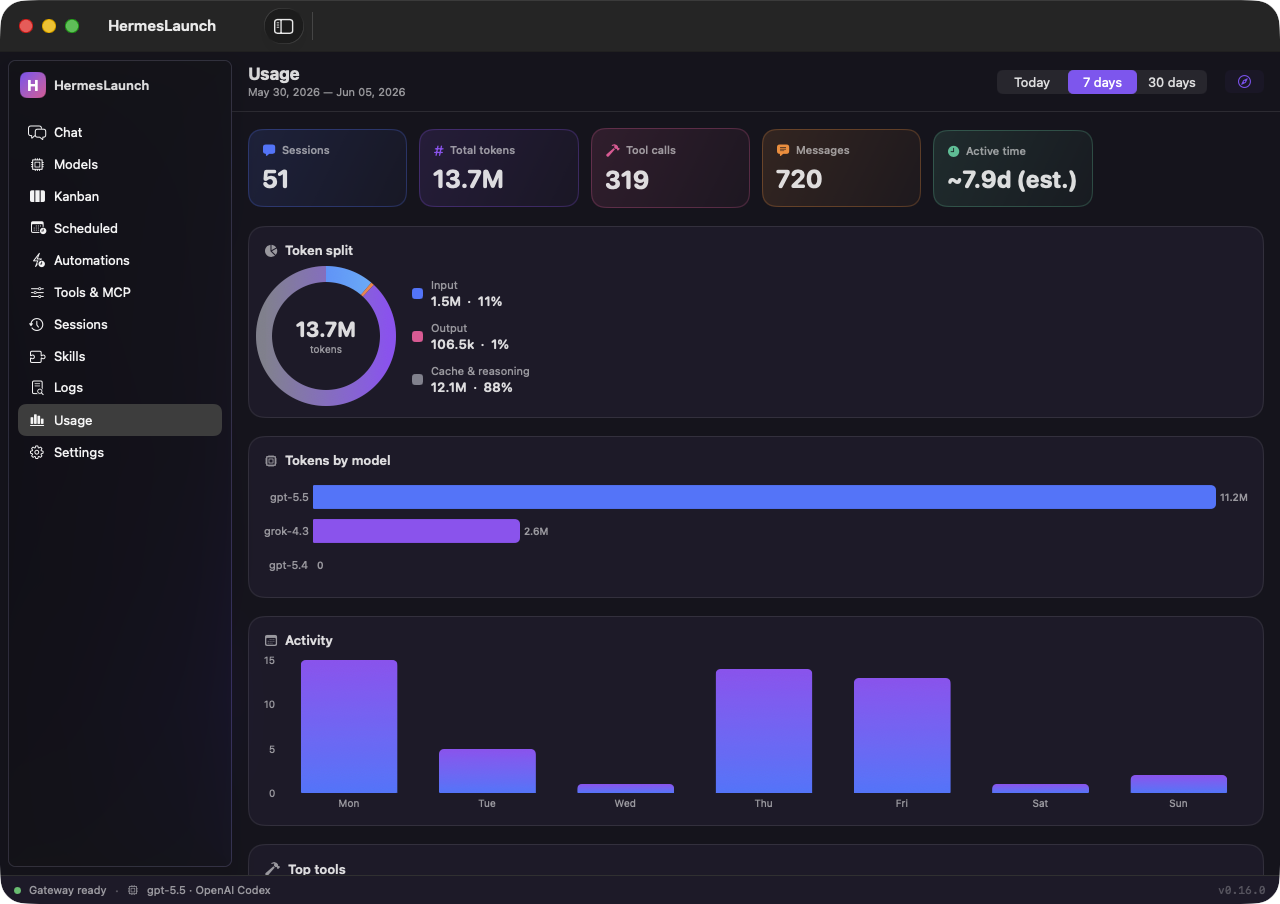
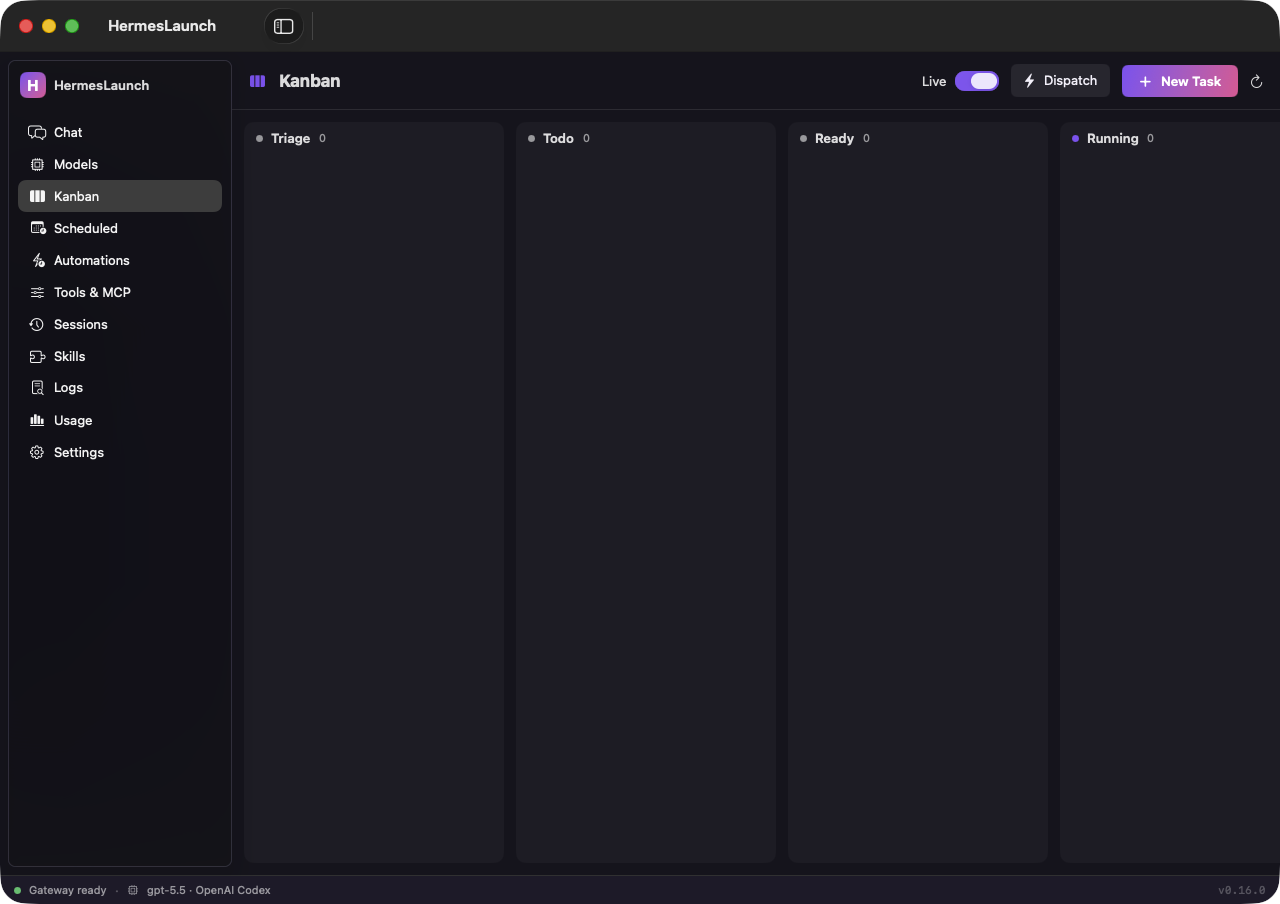
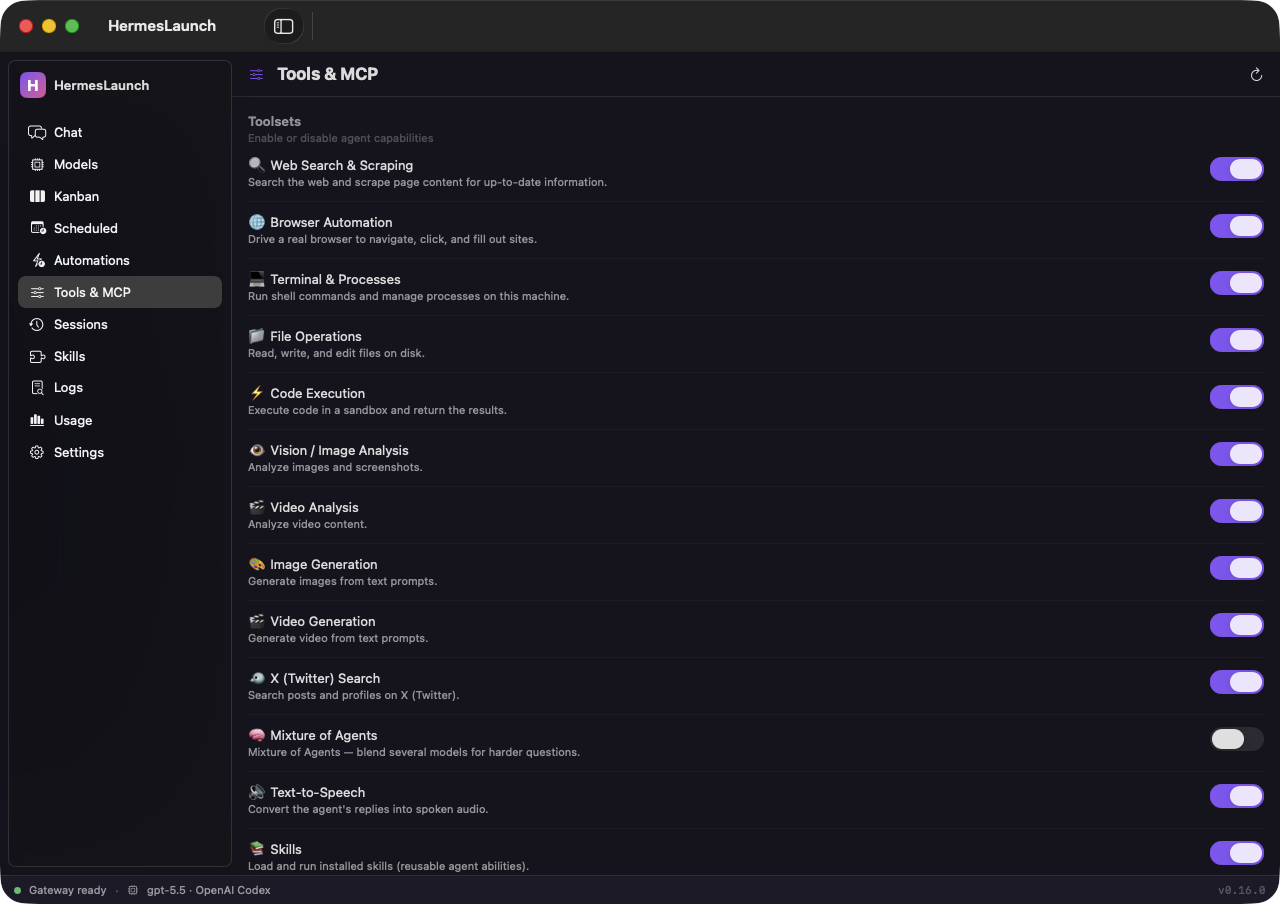
<div align="center"> <table> <tr> <td width="50%"><img src="assets/app-models.png" alt="In-app model picker" width="100%" /></td> <td width="50%"><img src="assets/app-usage.png" alt="Usage dashboard" width="100%" /></td> </tr> <tr> <td align="center"><sub><b>Models</b> — switch the default model in-app, collapsible by provider</sub></td> <td align="center"><sub><b>Usage</b> — Swift Charts over <code>hermes insights</code></sub></td> </tr> <tr> <td width="50%"><img src="assets/app-kanban.png" alt="Kanban board" width="100%" /></td> <td width="50%"><img src="assets/app-tools.png" alt="Tools & MCP manager" width="100%" /></td> </tr> <tr> <td align="center"><sub><b>Kanban</b> — watch swarm agents work, live</sub></td> <td align="center"><sub><b>Tools & MCP</b> — toggle capabilities, manage servers</sub></td> </tr> </table> </div>
⌘ Command palette & voice
Press ⌥Space from any app. Fuzzy-search commands, jump to any pane, resume a recent session, or ask Hermes a question and watch the answer stream inline. Click the mic to dictate locally, and turn on Speak Replies to hear the answer — all on-device.
<div align="center"> <img src="assets/command-palette.png" alt="Command palette with inline AI and voice dictation" width="640" /> </div>
✨ Features
| 🪟 Unified app window | One window with a sidebar — Chat, Models, Kanban, Scheduled, Automations, Tools & MCP, Sessions, Skills, Logs, Usage, Settings — and a status bar showing gateway, model & version. Hybrid presence: a menu-bar companion always, a Dock icon while the window is open. |
| ⌘ Command palette | ⌥Space anywhere opens a Spotlight/Raycast-style palette — fuzzy-search every action, jump to any pane, resume recent sessions, or type a question for an inline streaming answer. Also driven by hermeslaunch:// URLs. |
| 🎙 Local voice | Push-to-talk dictation into the chat composer and command palette, plus optional spoken replies — fully on-device via FluidAudio's Parakeet (STT) and Kokoro (TTS) CoreML models on the ANE. Audio never leaves your Mac. |
| 💬 Chat | Streaming chat over the Hermes ACP protocol — watch thinking and tool/search activity in real time, then the streamed answer. A clean serif home screen sits above a pill composer with attach, mic, and a spoken-reply toggle. Switch models mid-chat, run slash commands, and attach images. |
| 🧠 In-app model picker | Browse every authenticated provider's models (collapsible by provider), see the current one, and switch the default with a click — no terminal. New-provider sign-in (OAuth) opens the wizard when needed. |
| 🗂 Kanban board | A native board over hermes kanban — watch swarm agents work tasks live (3-second refresh), and drive the full lifecycle: create, promote, assign, comment, block/unblock, complete, archive, dispatch. |
| 🎛 Tools & MCP manager | Toggle the agent's toolsets (each with a description) and add / remove MCP servers — no config.yaml editing. |
| ⚡ Automations hub | Event-driven + scheduled activation in one place: cron jobs, shell hooks, and webhooks. |
| 📊 Usage dashboard | SwiftUI + Swift Charts over hermes insights: stat cards, an input/output token donut, and bars for models, activity, top tools — over Today / 7d / 30d, plus the full web dashboard. |
| 🗂 Sessions · Skills · Logs | Search/resume past conversations; install/update/uninstall skills; tail and filter logs — each a pane. |
| 🚀 Launch the TUI, caffeinated | Start a TUI session in one click under caffeinate -is, so your Mac won't sleep mid-run. Auto-starts the gateway. |
| ⏰ Scheduled tasks | Create/run/pause/delete recurring agent jobs (hermes cron) with a visual schedule builder and a delivery target. |
| 🎨 16 themes | Recolor the whole app — Hermes, Azul, Midnight, Fireside, Mono, Keanu, Slate, all four Catppuccin flavors, plus Dracula, Tokyo Night, Nord, Gruvbox, Rosé Pine. Each declares light or dark, and the whole window follows. Style the menu-bar model text too (rainbow / solid / gradient / pulse). |
| 🛰 Gateway control | Start / stop / restart the messaging gateway, see live status & PID, tail logs, or send a one-off message. |
| 📨 Send to Hermes | A system-wide Services action: select text in any app → reply copied to your clipboard. |
| 🔁 Self-updating | Run from a git clone and HermesLaunch can pull → rebuild → relaunch when new commits land. |
| 🔔 Ambient + notifications | A "▶ agents working" menu indicator and macOS notifications when tasks finish, the TUI exits, or an update is ready. |
🎨 Themes
Recolor the entire app — background, surfaces, text, and accents — from 16 built-in themes, each declaring light or dark so the whole window (native controls included) follows along. Choose from Hermes, Azul, Midnight, Fireside, Mono, Keanu, Slate, all four Catppuccin flavors (Latte · Frappé · Macchiato · Mocha), Dracula, Tokyo Night, Nord, Gruvbox, and Rosé Pine. You can also style the menu-bar model text — rainbow, solid, a gradient through your own colors, or a pulse.
<div align="center"> <table> <tr> <td width="50%"><img src="assets/app-settings.png" alt="Theme picker grid" width="100%" /></td> <td width="50%"><img src="assets/app-chat-light.png" alt="Light theme — Catppuccin Latte" width="100%" /></td> </tr> <tr> <td align="center"><sub><b>Theme picker</b> — 16 palettes, light & dark</sub></td> <td align="center"><sub><b>Light themes too</b> — the whole window follows</sub></td> </tr> </table> </div>
🧭 Menu-bar companion
The menu-bar H stays a fast launcher even when the window is closed:
- Open HermesLaunch
⌘1— open the main window (any pane) - Command Palette…
⌘K(or ⌥Space anywhere) — fuzzy search + inline AI + voice - ▶ N agents working… — appears when Kanban tasks are running (auto-hidden when idle)
- Status / Today — current model · provider and today's session/token usage (read-only)
- ● Update available / ● HermesLaunch update available — install Hermes or pull-rebuild-relaunch the app
- Speak Replies — toggle on-device spoken answers
- Gateway ▸ · Profile ▸ · Model ▸ (favorites + in-app picker) · Run Doctor · Usage…
- Manage ▸ (Scheduled · Sessions · Skills · Logs · Back Up · Restore) · Cockpit ▸ (Kanban · Tools & MCP · Automations)
- Start / Stop Hermes
⌘S/⌘X· Resume Session ▸ · About · Quit⌘Q
Menu-bar icon states: ⚪ idle · 🔵 TUI running · 🔴 gateway installed but stopped. Terminal: TUI / wizard actions open in Ghostty if installed, else Terminal.app.
📋 Requirements
- macOS 14 (Sonoma) or later — required by the FluidAudio voice engine (CoreML / ANE)
- Xcode Command Line Tools —
xcode-select --install(provides the Swift toolchain &swift build) - The Hermes Agent CLI on your
PATH(Chat & the palette also usehermes acp) - Optional: a microphone for voice dictation — macOS prompts on first use; transcription is on-device
- Optional: Ghostty for terminal actions — falls back to Terminal.app automatically
🚀 Quick start
git clone https://github.com/superluis0/HermesLaunch.git
cd HermesLaunch
./build.sh            # first run fetches FluidAudio via SwiftPM
open HermesLaunch.app
Install it for good (and add to Login Items if you like):
cp -R HermesLaunch.app /Applications/
HermesLaunch starts in your menu bar (look for the H). Open the main window from the menu or with ⌘1 / ⌥Space — a Dock icon appears while it's open and disappears when you close it.
⚙️ Configuration
HermesLaunch finds the hermes binary automatically (defaults override → HERMES_BIN →
~/.local/bin, Homebrew, /usr/local/bin → your shell's PATH). If it lives somewhere unusual:
defaults write com.hermeslaunch.HermesLaunch hermesPath /full/path/to/hermes
…then relaunch. If hermes can't be found at all, you'll get a one-time setup alert.
🏗 How it works
┌───────────────────────────────┐
│  Menu bar (AppKit) + palette   │   status polling · gateway · services · ⌥Space summon
│                                │
│  Main window  (SwiftUI)        │
│   ├─ Chat / Models  ───────────│── ACP JSON-RPC over stdio ──▶  hermes acp
│   ├─ Kanban / Tools / Auto ────│── shells out ───────────────▶  hermes kanban · tools · mcp · cron …
│   ├─ Usage  ───────────────────│── parses ───────────────────▶  hermes insights
│   └─ Voice  (FluidAudio) ──────│── on-device CoreML / ANE ───▶  Parakeet ASR · Kokoro TTS
└───────────────────────────────┘            shells out ──────▶  hermes <cmd>
The app is a thin front-end: it shells out to your hermes CLI, which manages its own credentials in
~/.hermes. Voice runs entirely on-device via FluidAudio
(Apache-2.0); its CoreML models download once to ~/Library/Application Support/FluidAudio/.
No API keys or secrets are stored in this project, and audio never leaves your Mac.
🧹 Uninstall
# Quit from the menu bar first, then:
rm -rf /Applications/HermesLaunch.app
defaults delete com.hermeslaunch.HermesLaunch   # clears saved preferences
🤝 Contributing
Issues and PRs welcome. The app builds via SwiftPM (./build.sh → swift build -c release, see
Package.swift) and is assembled into the .app bundle. The shell + panes live in AppShell.swift,
MainWindowController.swift, CommandPalette.swift, Voice.swift, ModelPicker.swift,
KanbanBoard.swift, ToolsMCP.swift, Automations.swift, ScheduledTasks.swift, SessionsBrowser.swift,
SkillsBrowser.swift, LogViewer.swift, UsageDashboard.swift, ChatView.swift, plus
DesignSystem.swift / Theming.swift / Settings.swift and the menu-bar core in HermesLaunch.swift. The only external
dependency is FluidAudio (fetched on first build).
The app icon is generated from code: edit make_icon.swift, then run ./make_icons.sh. README
screenshots are captured with ./make_screenshots.sh (needs Screen Recording permission for your terminal).
📄 License
MIT — do whatever you like.
<div align="center"><sub>Built with ☕ for the Hermes community.</sub></div>